


Your team bought the AI writing tool. Drafts that used to take an afternoon now take twenty minutes, and nobody wants to go back. On paper, that is exactly what you paid for. Then you look at the content calendar at the end of the quarter, and the number of polished pieces is about the same as before. Campaigns still launch late. The team is still busy.
This is what AI in marketing automation looks like for most teams right now. Faster drafting did not remove the bottleneck. It moved it and made it visible. What follows is what AI actually does inside a marketing system, which parts of your process are ready for it, and the order of operations that gets you to a first automation worth defending.
Why Most AI Marketing Automation Fails Before It Starts
Automation won’t fix a poorly defined process. It simply runs the same process faster, including the parts that were already causing problems. If approvals were unclear before, automation simply moves the same ambiguity through the process faster.
91% of marketing teams now use AI, up from 63% a year earlier. Over the same period, blockers coming out of legal, compliance and brand review grew 3.4x, and they are now the number one barrier to scaling AI. The data points to a familiar pattern: content creation has been one of the first areas teams automate, while review and compliance can remain largerly manual.
Jasper, State Of AI in Marketing 2026
Two recurring problems have little to do with technology:
- The tool comes before the problem: Someone sees a demo, the budget exists, and the tool arrives looking for something to do.
- The verdict comes too early: A workflow gets judged in week three, before anyone has enough data to tell signal from noise, and it gets quietly abandoned.
In both cases, the team starts with the technology before understanding the process. That makes it difficult to identify which step is actually worth changing.
What “AI in Marketing Automation” Actually Means
Traditional marketing automation runs on rules someone wrote down in advance: if a lead fills in this form, add them to that list, then send this email three days later. It is dependable, but it can only act on conditions and branches that someone has defined in advance. It cannot tell the difference between a warm lead and a curious stranger, because nobody told it how.
AI-powered marketing automation adds a layer that traditional marketing automation never had: the ability to interpret unanticipated input and act on it without manual intervention. A traditional marketing automation system needs a human to define every branch. An AI-enabled workflow can classify or interpret the input and use that result to determine what happens next.
In practice, most marketing automation tools today mix both. Scheduling, list management, and basic triggers stay rule-based because rules are cheap, predictable, and easy to audit. The AI layer sits on top, handling the parts where the input is messy: what a lead actually meant in a support message, which offer a specific customer is likely to respond to, what content a segment should see next. That distinction matters when evaluating tools: some workflows need conventional automation, while others benefit from an AI model inside the workflow.
How AI Actually Works Inside Marketing Automation Systems
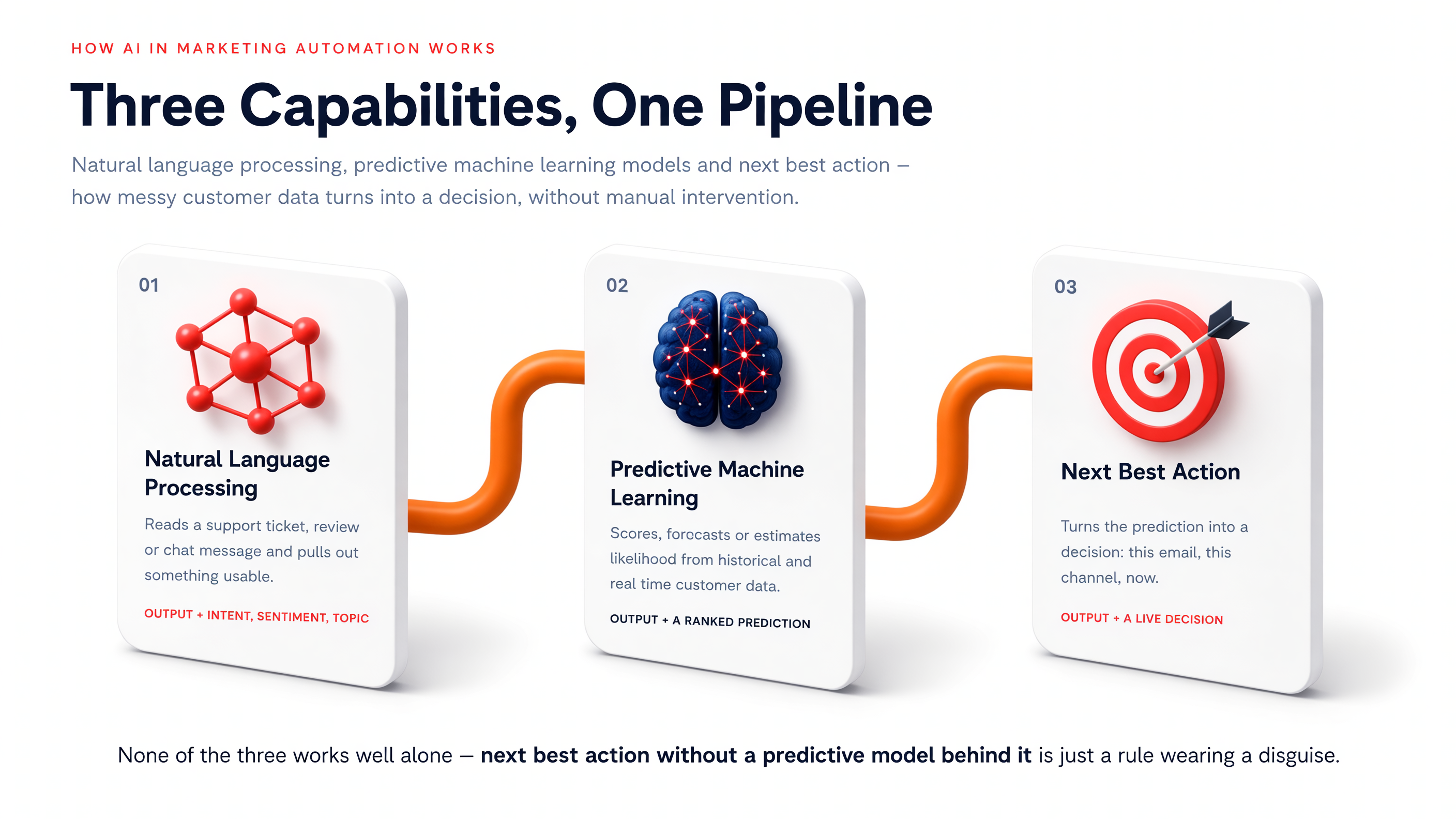
Three capabilities account for many AI functions in marketing automation: natural language processing, predictive machine learning models, and Next Best Action systems.
Natural Language Processing
Natural language processing is what lets a marketing automation system read a support ticket, a review, or a chat message and extract something usable from it: intent, sentiment, urgency, topic. Without it, unstructured customer data (the free text people actually write) stays invisible to any rule-based system. With it, a message can be routed, tagged, or answered without a person reading it first. Definition: Salesforce, “What Is NLP”
Predictive Machine Learning Models
Predictive analytics is the second piece. A machine learning model trained on historical customer data can score a lead, forecast churn, or estimate the likelihood that a specific customer converts on a specific offer. It does not create information that is absent from its input data. Its advantage is that it can process large numbers of signals consistently and at a scale no analyst can match, updating as soon as new customer data arrives.
Next Best Action
Next best action engines take the output of those predictive models and turn it into a decision: this email, not that one; this channel, not that one; now, not next week. This is the part of marketing automation that most visibly happens without manual intervention, because by the time a person could review the decision, the moment it applied to has usually passed. Definition: Wikipedia, “Next-based-action marketing”
Step One: Map the Process Before You Automate It
A process is a sequence of steps, each with an input, an output, an owner, and a point where somebody decides something. If you cannot describe it that way, you have a habit, not a process. Mapping is deliberately low-tech: one table, filled in by the people who actually do the work, not by IT.
| Field | What goes in it |
| Process name | Short and recognizable |
| Frequency | Daily, weekly, monthly |
| Duration | Minutes or hours per cycle |
| Steps | In order, one per row |
| Tools | Where the step actually happens |
| What is tedious | Subjective, and it reveals candidates |
| What comes out at the end | A concrete output |
Map the process as it is, not as it should be. And apply one test to every row: if you cannot describe a step precisely enough to hand it to a new colleague with no context, you cannot hand it to a machine either. “I make reports” cannot be automated by anyone. “Every Monday I copy campaign data from Meta Ads Manager into a template and send it to my manager” reads like a specification.
Step Two: Tag Every Step, Then Match It to a Workflow Type
Once the map exists, give every step one of three tags: already automated, where a tool handles it end to end; partially automated, where a tool exists but a person still copies, reformats, or chases something around it; and stays human, where judgment and accountability do not transfer to a tool regardless of what tag you give the step.
Partially automated rows are often the easiest starting point because much of the required tooling is already in place.
The second layer is identifying the type of workflow, because the source of friction – and therefore the appropriate automation – differs from one workflow to another.
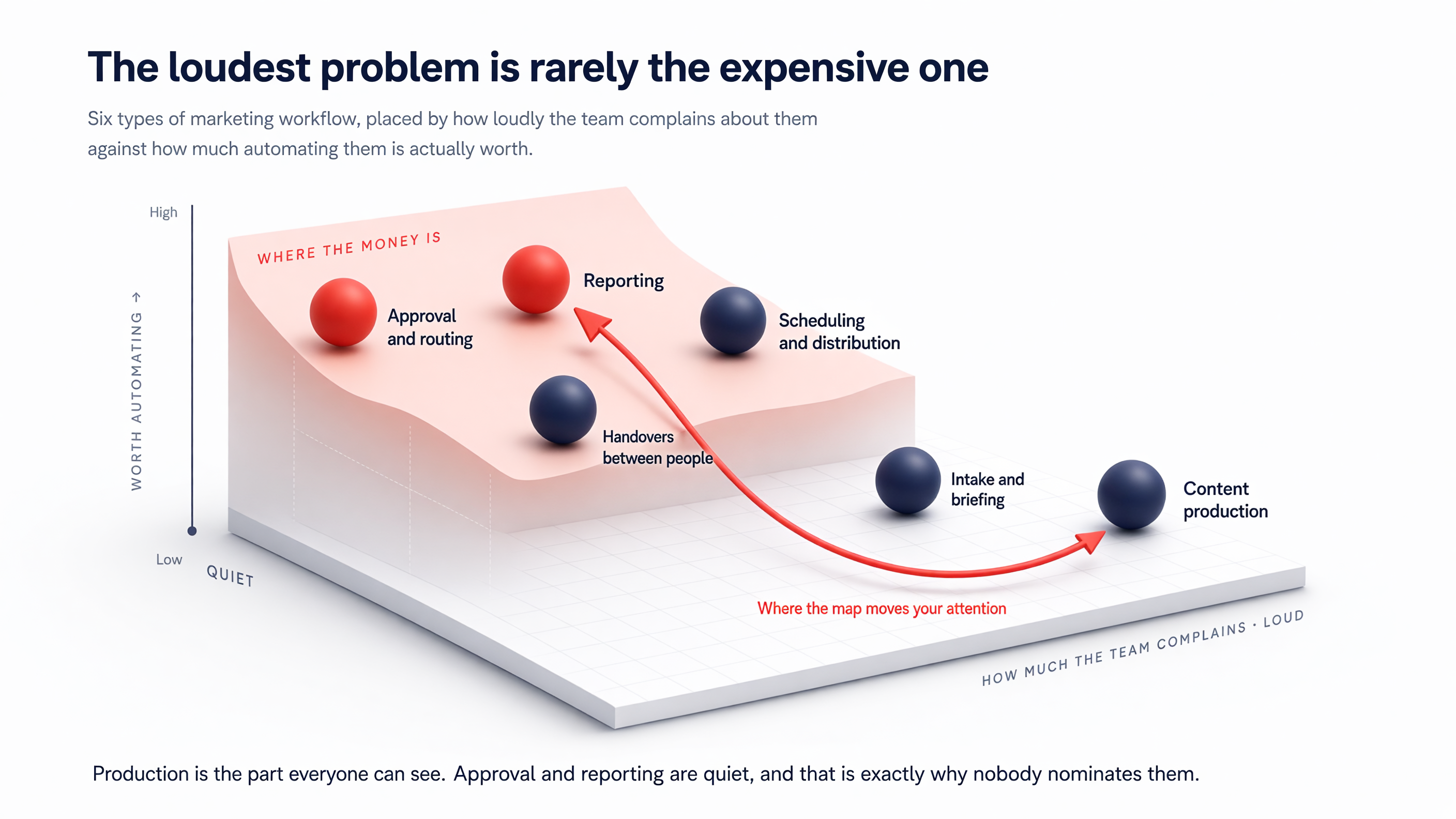
| Workflow type | What slows it down | Realistic potential |
| Intake and briefing | Inconsistent input | High, and easy |
| Content production | Creative judgement | Medium, with oversight |
| Approval and routing | Waiting, not working | Very high |
| Scheduling and distribution | Manual re-entry | High, and easy |
| Reporting | Copying data between systems | Very high |
| Handovers between people | Nobody can see status | High |
Where the work actually hurts
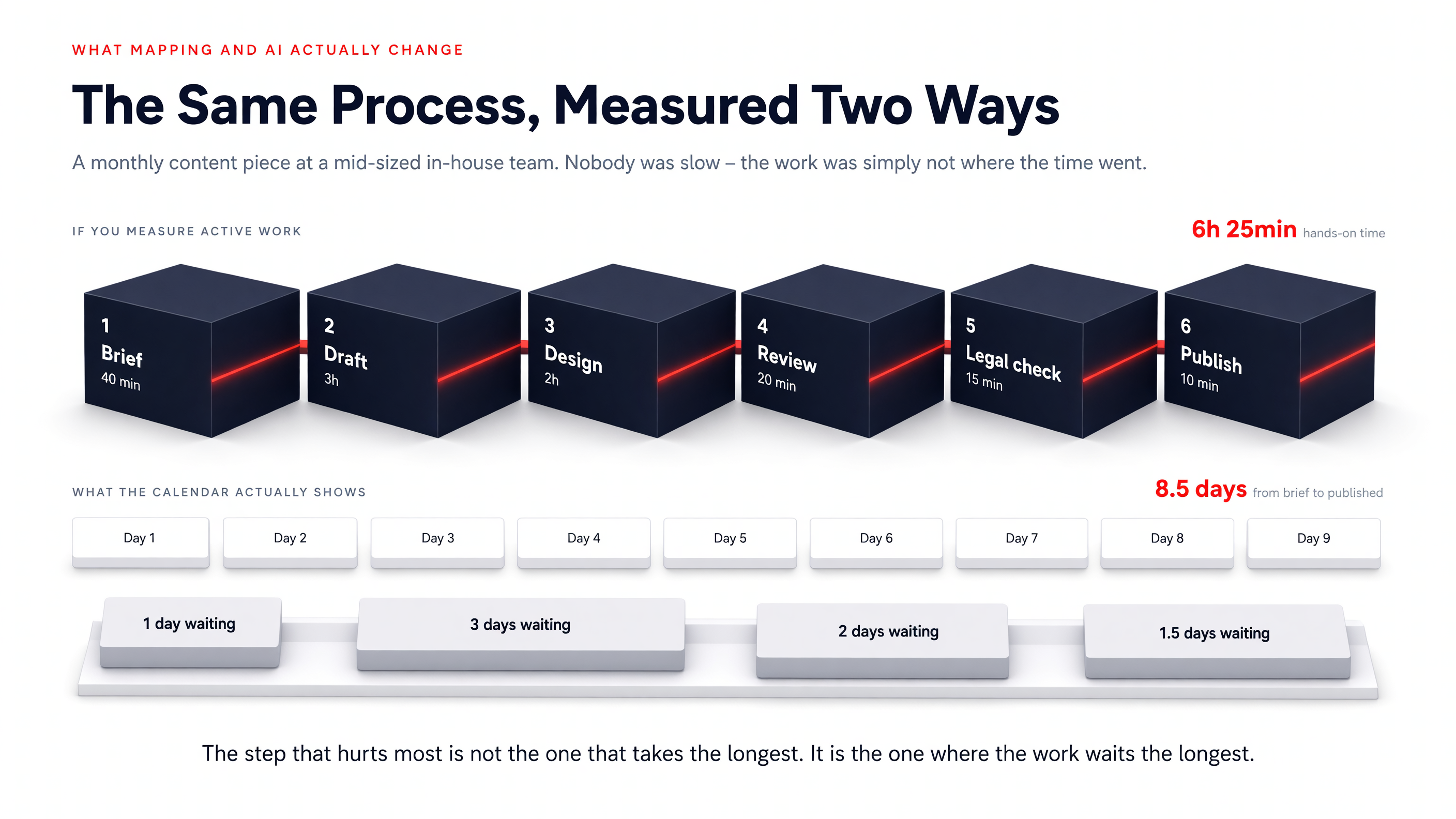
The step with the biggest impact is not always the one that takes the longest. Often, it is the step where work spends the most time waiting. Active work is visible, so marketing teams instinctively reach for content production first, when the bigger cost is usually sitting in the queue between people.
Real Use Cases: That Mapping and AI Actually Change
A mid-sized company’s in-house marketing team, a handful of people producing content across several channels, was convinced it had a production problem. The plan going in was to automate writing and asset creation.
The mapping exercise surfaced four processes: planning, content production, scheduling, and content approval. Approval was the one nobody had nominated, and it turned out to have the biggest impact of the four, not because the work took long but because content sat still between people. That pattern lines up with the industry-wide 3.4x growth in review and compliance blockers: The approval task itself was relatively small. Most of the elapsed time came from waiting between reviewers.
Beyond that one example, the marketing automation use cases where AI actually earns its place tend to combine unstructured customer input, a repeatable decision, and enough volume to make manual handling impractical.
- Lead scoring: A predictive model ranks inbound leads against customer data from past conversions, so sales spends time on the right conversations first.
- Dynamic segmentation: Customers get grouped by behavior, not by a static list someone updates manually once a quarter.
- Support and inbox triage: Natural language processing reads incoming messages and routes them, catching the urgent ones before a human ever opens the inbox.
- Personalized next best action: A returning customer sees the offer the model estimates they will actually respond to, chosen from real-time data rather than the last campaign sent to everyone. Same logic as personalization in marketing design, just running on live behavioral data instead of a static segment.
Each of these replaces a step a person used to do by hand with one that runs without manual intervention. None of them replaces the decision about whether that step was worth automating in the first place. That decision still needs the map.
Choosing the Right Tool: AI or Just Automation
Once the process is mapped, tool selection becomes a much more concrete exercise, a consequence of steps above rather than a starting point. For a sense of the range of tools marketing teams are actually buying right now, see the Kontra roundup of AI tools for everyday marketing challenges.
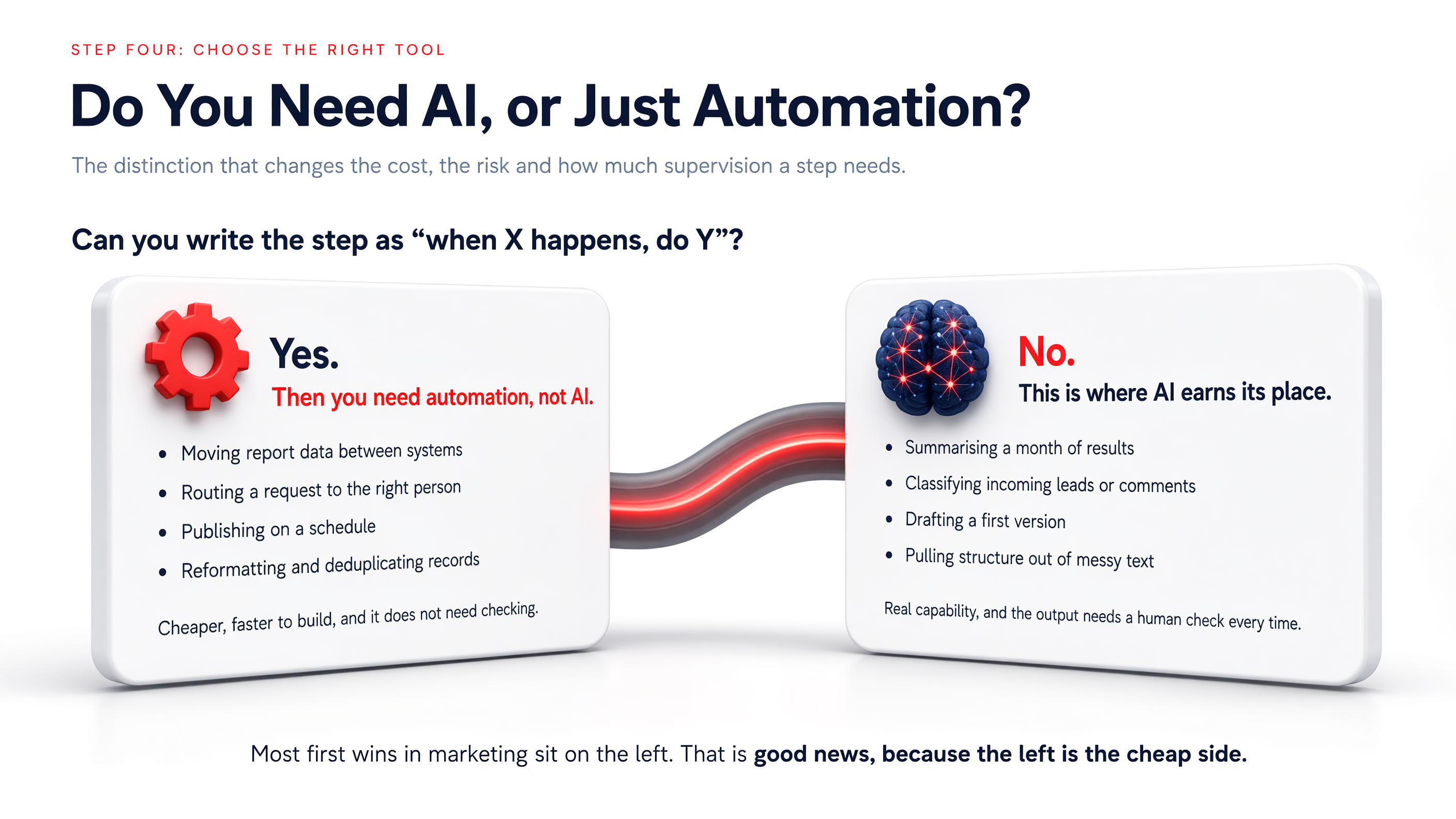
| Rule-based automation | AI | |
| Input | Structured and predictable | Unstructured, different every time |
| Rule | Known in advance | Requires judgement |
| Output | Identical every time | Varies |
| Checking | Rarely needed | Needed almost always |
| Cost and risk | Low | Higher |
The rule of thumb is short: if you can describe the step as “when X happens, do Y”, you do not need AI. Most first wins in marketing are ordinary automation tools, not AI, and that is good news, because they are cheaper and more reliable. AI earns its place where the input is messy: summarising, classifying, drafting, or pulling structure out of unstructured customer data.
When you evaluate a tool, start with five questions. Does it connect to what you already use? Who will maintain it once the person who set it up leaves? Can you see what it did? Where does the customer data live, and who can see it? And what does it cost at scale, rather than during the trial? Run one process live before adding the next. If five things change in the same month, you cannot tell which one produced the result.
Measure More Than Hours Saved
Hours saved is useful, but it is rarely enough on its own to demonstrate business value. Measure along three axes instead.
- Time saved: Kept, but never presented alone.
- Reduced risk and better quality: A mistake in published content costs more than a lost hour.
- New capacity: The things the team now does that it previously never got to.
This is also where the promised benefits of AI in marketing automation either show up in the numbers, or they do not. The relevant business metric depends on the workflow: conversion, revenue, cost, response time, error rate, or additional capacity. Whichever it is, it depends entirely on turning model output into data-driven insights someone acts on, not just a dashboard nobody opens.
Only 41% of marketers can confidently prove ROI, down from 49% a year earlier. Yet among those who actually track it, 60% report at least 2x return. Marketers no longer measure success by hours saved alone. The expectation now is a link to pipeline and revenue.
Jasper, State of AI in Marketing 2026
For a broader view of building decision-making on evidence rather than impressions, the Kontra guide to the fundamentals of digital analytics covers the groundwork.
One rule matters more than the rest: set up your measurement before you switch anything on. Once the automation is live, you no longer have a clean baseline to compare against.
Your First 30 Days
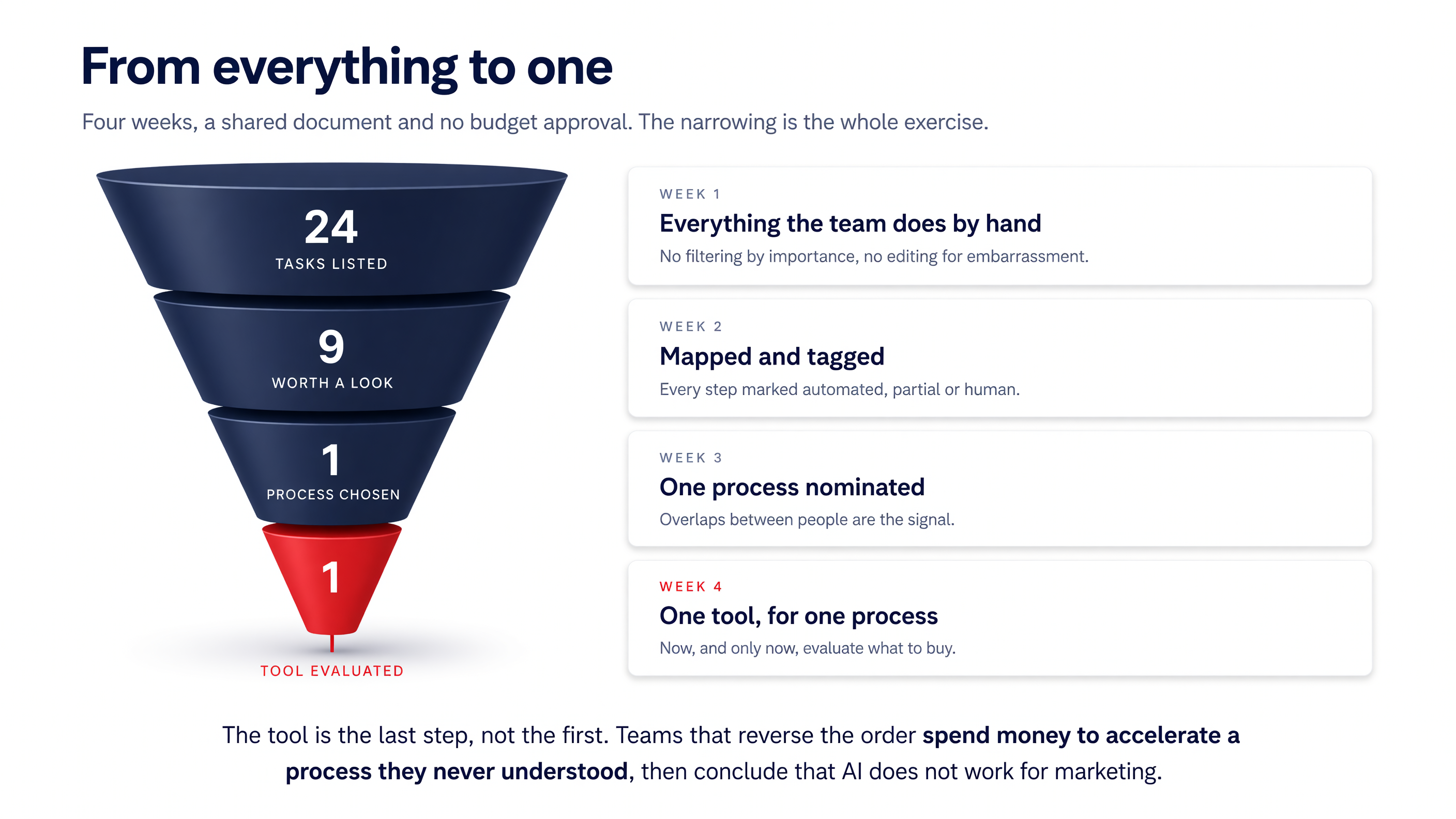
- Week one: Every team member lists their manual, repetitive tasks, without filtering by importance.
- Week two: For each task, fill in the mapping table from step one and tag every step as automated, partial, or human.
- Week three: The team compares maps together. Look for recurring problems: when several people independently describe the same friction, that process is worth investigating first. Each person nominates one process they would automate first.
- Week four: Only now, evaluate marketing automation tools, and only for that one process.
Map first, Automate Second
Go back to that team from the opening, the one whose drafting got faster while output stayed flat. Nothing was strong with the tool. It did what it promised. It targeted a step that was never the real constraint, chosen because it was the loudest rather than the most expensive.
AI in marketing automation is not one thing you buy. It is natural language processing, predictive machine learning models, and next best action logic, applied to a process that someone has actually mapped first. Automating a poorly defined process gives you a faster, poorly defined process. Mapping it first gives you a small, provable win, and something to point to when you ask for budget on the next one.
If you want a second pair of eyes on your process map, or help deciding whether a workflow needs AI or just a connection between two systems, get in touch. That conversation is usually shorter and cheaper than the tool you were about to buy.


